
Online agents overview
Chorus can start and steer agent work on machines you keep online. This page explains that model — what an online agent is, how a project pins work to one, how a single conversation follows an idea, and how you interrupt, resume, or take over — then points to the page where you actually do each thing. For the collaboration workflow those agents run, see The AI-DLC workflow; for the plugin commands they expose, see Commands and skill routing.
What an online agent is
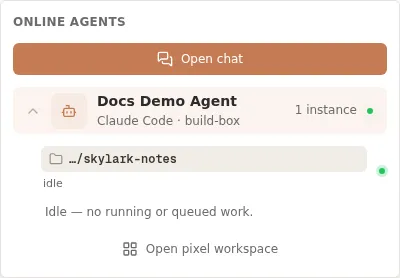
Section titled “What an online agent is”An online agent is a chorus daemon process, authenticated with an agent API key, that
holds a live connection to Chorus. While it runs, Chorus can reach it to start work, send a
follow-up instruction, interrupt a running turn, or resume a stopped one — without you
touching the machine.
Each connection is addressed by three things: the agent identity (the API key), the
host it runs on, and the working directory (cwd) it serves. One daemon can host
several independent agents — each with its own key and identity — and serve several
directories per agent; every registered (agent, host, directory) combination becomes its
own addressable target. Chorus
shows every connection’s presence — online or offline, with its backend, host, and directory
— in Settings → Agents.
How a project pins to a directory
Section titled “How a project pins to a directory”A project can be fixed to a specific online agent and working directory. Once anchored, agent work started from that project’s UI routes to the same connection and directory, and the working-directory picker is suppressed — you do not re-choose the target each time. See Create a project for how to set, replace, or clear that preference.
One session per idea
Section titled “One session per idea”A direct idea has a single canonical conversation, and its session id is the idea’s own identifier — so every wake for that idea reaches the same conversation. If you wake the idea from a different working directory, Chorus re-points that one session to the new directory rather than forking a second conversation, so the idea keeps one continuous history.
Interrupt, resume, and take over
Section titled “Interrupt, resume, and take over”While an agent is working you can interrupt the current turn, resume a stopped conversation with added context, or take over the conversation from a terminal using its copied session id. These controls act on an existing conversation rather than starting a new one. See Interrupt and resume a session.
OpenClaw connects through the OpenClaw gateway rather than chorus daemon, so it is a
gateway-model connection — see OpenClaw.
Where to do each thing
Section titled “Where to do each thing”Each capability of the online-agent model has one place you perform it and one page that documents it in full.
| Capability | Where you do it | Read more |
|---|---|---|
| Reverse control (interrupt, resume) | The conversation’s Interrupt and Resume controls; the daemon receives them over POST /api/daemon/control | Interrupt and resume a session |
| Wake and wake-queue | Start or continue agent work from a project item; a wake for a busy directory is queued until it is free | Start work on a remote agent |
(agent, host, cwd) addressing | Register each working directory when you start the daemon (repeatable --cwd) | Operate the Chorus daemon |
| Presence | Settings → Agents shows each connection’s online state, backend, host, and directory | Connect an agent runtime |
| Remote start | Pick an online directory, enter an instruction, then Start session | Start work on a remote agent |
| Ad-hoc “continue in an online directory” | Hand a new idea to an online agent from the new-idea dialog’s conversational mode | Capture an idea |
| Multi-backend (Claude Code, Codex, Kiro) | Choose the backend per connection with --agent | Agent platforms |